
女朋友的微博页
这是一个非常有趣的想法,将女朋友的微博做成一个主页,每天打开Chrome就能看到超级漂亮的女朋友。
获取数据
和IFTTT相似,即刻也能关注某个用户的微博动态并发送更新提醒,但是不同的是,即刻会对所有的数据进行一个副本的拷贝,即使是博主删除了本条微博,即刻的微博动态数据中还是有的。
更方便的是,即刻最近发布了即刻网页版,抓取一下网页版的数据就可以获取某个主题(topic)下的所有内容。
1.创建更新动态
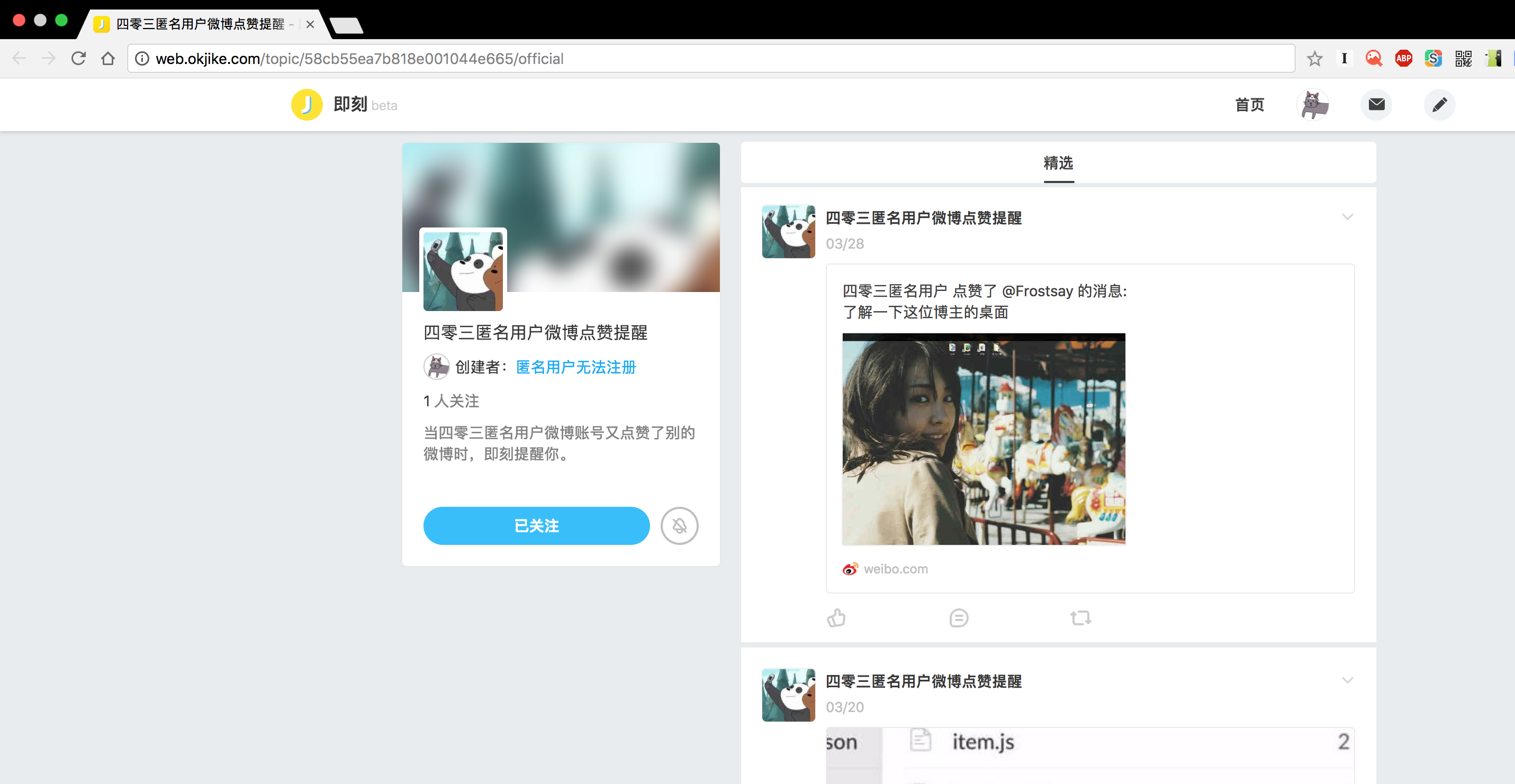
通过即刻APP创建一个主题来获取微博更新动态。
在网页版中,就可以找到刚刚创建的主题。
2.获取API接口
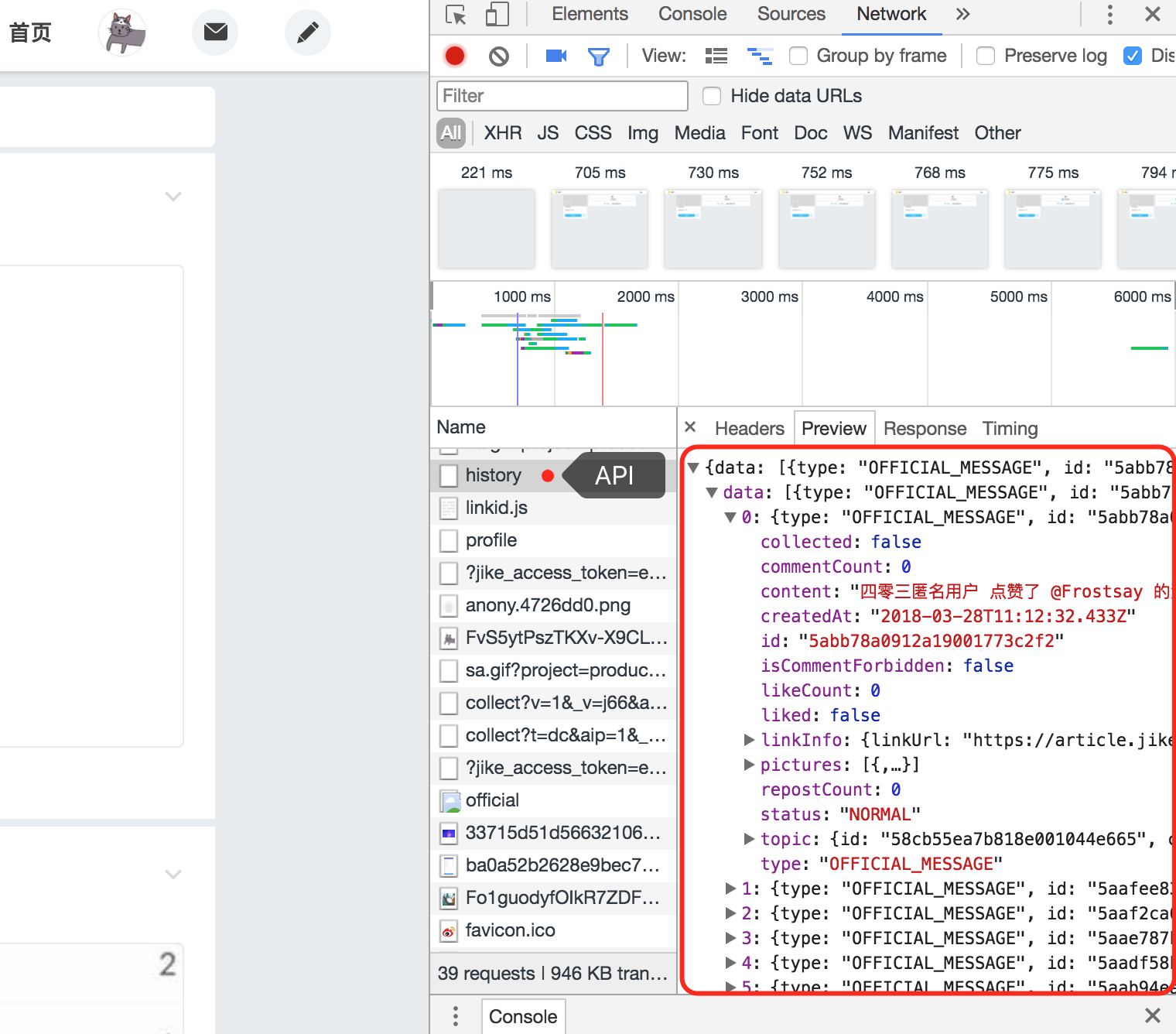
通过审查元素可以找到获取动态的API接口,为https://app.jike.ruguoapp.com/1.0/messages/history。
通过PostMan测试可正常获取数据。
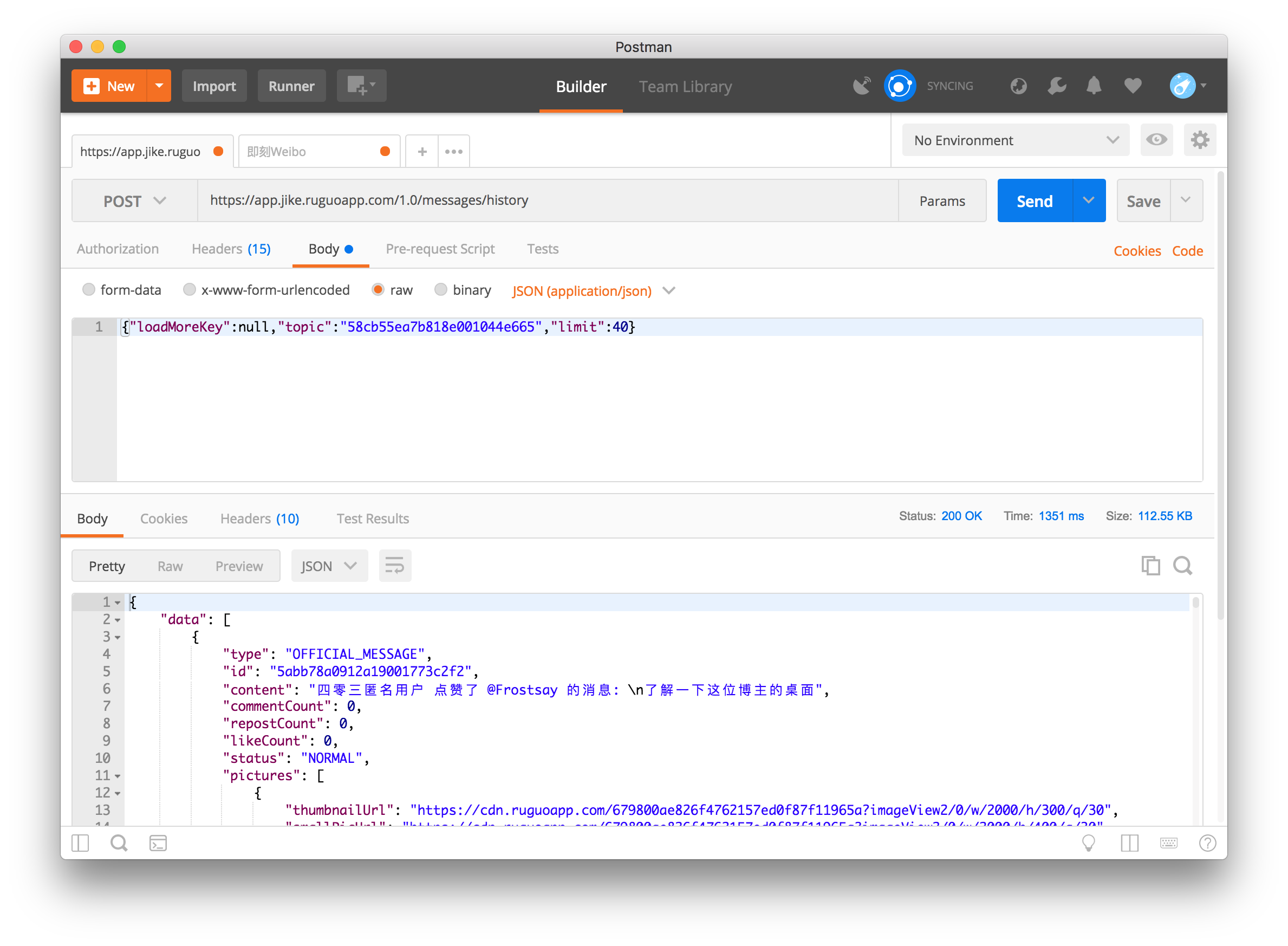
3.模拟登录获取动态
通过CURL模拟登录获取动态,需要注意的是,即刻在Request的Header增加了x-jike-app-auth-jwt认证字段,所以需要将Request的Header一起发送。
更详细的参数可以history中的Request Header中查看。
$curl = curl_init();
curl_setopt_array($curl, array(
  CURLOPT_URL => "https://app.jike.ruguoapp.com/1.0/messages/history",
  CURLOPT_RETURNTRANSFER => true,
  CURLOPT_ENCODING => "",
  CURLOPT_MAXREDIRS => 10,
  CURLOPT_TIMEOUT => 30,
  CURLOPT_HTTP_VERSION => CURL_HTTP_VERSION_1_1,
  CURLOPT_CUSTOMREQUEST => "POST",
  CURLOPT_POSTFIELDS => "{\"loadMoreKey\":null,\"topic\":\"主题ID\",\"limit\":40}",
  CURLOPT_HTTPHEADER => array(
    "accept: application/json",
    "accept-encoding: gzip, deflate, br",
    "accept-language: zh-CN,zh;q=0.9,la;q=0.8,en;q=0.7,zh-TW;q=0.6,mt;q=0.5",
    "app-version: 4.1.0",
    "cache-control: no-cache",
    "connection: keep-alive",
    "content-length: 66",
    "content-type: application/json",
    "host: app.jike.ruguoapp.com",
    "origin: http://web.okjike.com",
    "platform: web",
    "pragma: no-cache",
    "referer: http://web.okjike.com/topic/主题ID/official",
    "user-agent: Mozilla/5.0 (Macintosh; Intel Mac OS X 10_13_0) AppleWebKit/537.36 (KHTML, like Gecko) Chrome/64.0.3282.186 Safari/537.36",
    "x-jike-app-auth-jwt: ***"
  ),
));

$response = curl_exec($curl);
$err = curl_error($curl);

curl_close($curl);
$code = array();
if ($err) {
    $code['code'] = 400;
} else {
    $code = json_decode($response, 1);
    $code['code'] = 200;
}

return json_encode($code);
需要注意的是,POST提交的数据是Payload格式的,需要声明Content-type为CURLOPT_HTTPHEADER => array("content-type: application/json"),再将提交的参数格式化为json数据:
$data = array(
    "name" => "jack",
    "age" => 13
);
$postData = json_encode($data);
4.整理数据
每条微博数据返回的json数据如下:
{
            "type": "OFFICIAL_MESSAGE",
            "id": "5aadf58b817887001733bf9d",
            "content": "四零三匿名用户 点赞了 @网易云阅读 的消息: \n李敖这辈子:做人有料,活的很傲。",
            "commentCount": 0,
            "repostCount": 0,
            "likeCount": 0,
            "status": "NORMAL",
            "pictures": [
                {
                    "thumbnailUrl": "https://cdn.ruguoapp.com/2db25e00a3c80155ca2f64a20e6b154b?imageView2/0/w/2000/h/300/q/30",
                    "smallPicUrl": "https://cdn.ruguoapp.com/2db25e00a3c80155ca2f64a20e6b154b?imageView2/0/w/2000/h/400/q/30",
                    "middlePicUrl": "https://cdn.ruguoapp.com/2db25e00a3c80155ca2f64a20e6b154b?imageView2/0/h/600/interlace/1/q/30",
                    "picUrl": "https://cdn.ruguoapp.com/2db25e00a3c80155ca2f64a20e6b154b?imageView2/0/h/2000/interlace/1",
                    "format": "jpeg",
                    "width": 1080,
                    "height": 1080
                },
                {
                    "thumbnailUrl": "https://cdn.ruguoapp.com/473fe6a7725f298b4d8dda92b5a892b7?imageView2/0/w/2000/h/300/q/30",
                    "smallPicUrl": "https://cdn.ruguoapp.com/473fe6a7725f298b4d8dda92b5a892b7?imageView2/0/w/2000/h/400/q/30",
                    "middlePicUrl": "https://cdn.ruguoapp.com/473fe6a7725f298b4d8dda92b5a892b7?imageView2/0/h/600/interlace/1/q/30",
                    "picUrl": "https://cdn.ruguoapp.com/473fe6a7725f298b4d8dda92b5a892b7?imageView2/0/h/2000/interlace/1",
                    "format": "jpeg",
                    "width": 1080,
                    "height": 1080
                },
                {
                    "thumbnailUrl": "https://cdn.ruguoapp.com/a4e55e4fcdaf83124d0e20a4e1c48113?imageView2/0/w/2000/h/300/q/30",
                    "smallPicUrl": "https://cdn.ruguoapp.com/a4e55e4fcdaf83124d0e20a4e1c48113?imageView2/0/w/2000/h/400/q/30",
                    "middlePicUrl": "https://cdn.ruguoapp.com/a4e55e4fcdaf83124d0e20a4e1c48113?imageView2/0/h/600/interlace/1/q/30",
                    "picUrl": "https://cdn.ruguoapp.com/a4e55e4fcdaf83124d0e20a4e1c48113?imageView2/0/h/2000/interlace/1",
                    "format": "jpeg",
                    "width": 1080,
                    "height": 1080
                }
            ],
            "topic": {
                "id": "58cb55ea7b818e001044e665",
                "content": "四零三匿名用户微博点赞提醒",
                "subscribersCount": 1,
                "squarePicture": {
                    "thumbnailUrl": "https://cdn.ruguoapp.com/Fo1guodyfOIkR7ZDFcuI6CiLXiMA.jpg?imageView2/1/w/120/h/120/format/jpeg/q/30",
                    "middlePicUrl": "https://cdn.ruguoapp.com/Fo1guodyfOIkR7ZDFcuI6CiLXiMA.jpg?imageView2/1/w/300/h/300/format/jpeg/q/30"
                },
                "topicType": "CUSTOM",
                "operateStatus": "ONLINE",
                "isValid": true,
                "subscribedStatusRawValue": 1,
                "enablePictureComments": true
            },
            "linkInfo": {
                "linkUrl": "https://article.jike.ruguoapp.com/?messageId=5aadf58b817887001733bf9d",
                "originalLinkUrl": "https://weibo.com/1968315541/G7VJ4yeqo",
                "linkIcon": "normalLink"
            },
            "collected": false,
            "liked": false,
            "createdAt": "2018-03-18T05:13:47.795Z",
            "isCommentForbidden": false
        },
即刻获取的微博数据有三种类型:图片(pictures)、视频(video)和文字(text),其中,每条微博数据总会有pictures字段,视频和文字的类型时该字段为空。
if (array_key_exists("pictures", $array)) {
        if (count($array['pictures']) == 0) {
            if (array_key_exists("video", $array)) {
                $type = "video";
                $thumbPictures = $array['video']['image']['picUrl'];
                $pictures = $array['video']['image']['picUrl'];
            } else {
                $type = "text";
            }
        } else {
            $type = "pictures";
            for ($i=0; $i < count($array['pictures']); $i++) {
                $pictures .= $array['pictures'][$i]['picUrl'] . ",";
                $thumbPictures .= $array['pictures'][$i]['middlePicUrl'] . ",";
            }
        }
    }
对于video内容,数据会返回微博的原始视频地址,只需要提取出视频的原始URL就可以了。
function getWeiboVideo($url)
{
    $url = preg_replace("/\d{10}/", "status", $url);
    $pageData = getCurl($url);
    preg_match("/(?<=\"stream_url\": \").*?(?=\")/si", $pageData, $videoUrl);
    return $videoUrl[0];
}

function getCurl($url)
{
    $curl = curl_init();
    curl_setopt($curl, CURLOPT_URL, $url);
    curl_setopt($curl, CURLOPT_HEADER, 0);
    curl_setopt($curl, CURLOPT_RETURNTRANSFER, 1);
    curl_setopt($curl, CURLOPT_SSL_VERIFYPEER, false);
    curl_setopt($curl, CURLOPT_SSL_VERIFYHOST, false);
    $data = curl_exec($curl);
    curl_close($curl);
    return $data;
}
更新数据
为了能够假装实时获取最新微博的数据,需要将原来的微博数据存储在数据库中,并且每隔一段时间再次获取最新微博数据。
1.数据更新
每条微博数据有个唯一的id值,抓取出最新数据后判断id值就可以知道是否是最新的数据。
include_once "linkSql.php";
$weiboDataArray = json_decode(getMeiliWeiboData(), 1);//返回微博数据
$getItemNum = mysqli_num_rows(mysqli_query($link, "SELECT * FROM meili_weibo"));//获取数据库中数据数目
if ($getItemNum == 0) {
    for ($i=count($weiboDataArray['data'])-1; $i >= 0; $i--) {
        inserData($link, $weiboDataArray['data'][$i]);//倒序插入数据
    }
} else {
    $tmpArr = array();
    $getLastItemId = mysqli_fetch_array(mysqli_query($link, "SELECT itemId FROM meili_weibo ORDER BY id DESC limit 1"), 1);//取出最新一条数据
    for ($i=0; $i < count($weiboDataArray['data']); $i++) {
        if ($weiboDataArray['data'][$i]['id'] != $getLastItemId['itemId']) {
            array_push($tmpArr, $weiboDataArray['data'][$i]);//将新数据压入栈中
        } else {
            break;
        }
    }
    for ($j=count($tmpArr)-1; $j >= 0; $j--) {
        inserData($link, $tmpArr[$j]);//插入新数据
    }
}
2.实时监控
通过每15分钟(或更少)获取一次数据进行数据对比就可以假装实时的数据更新了。
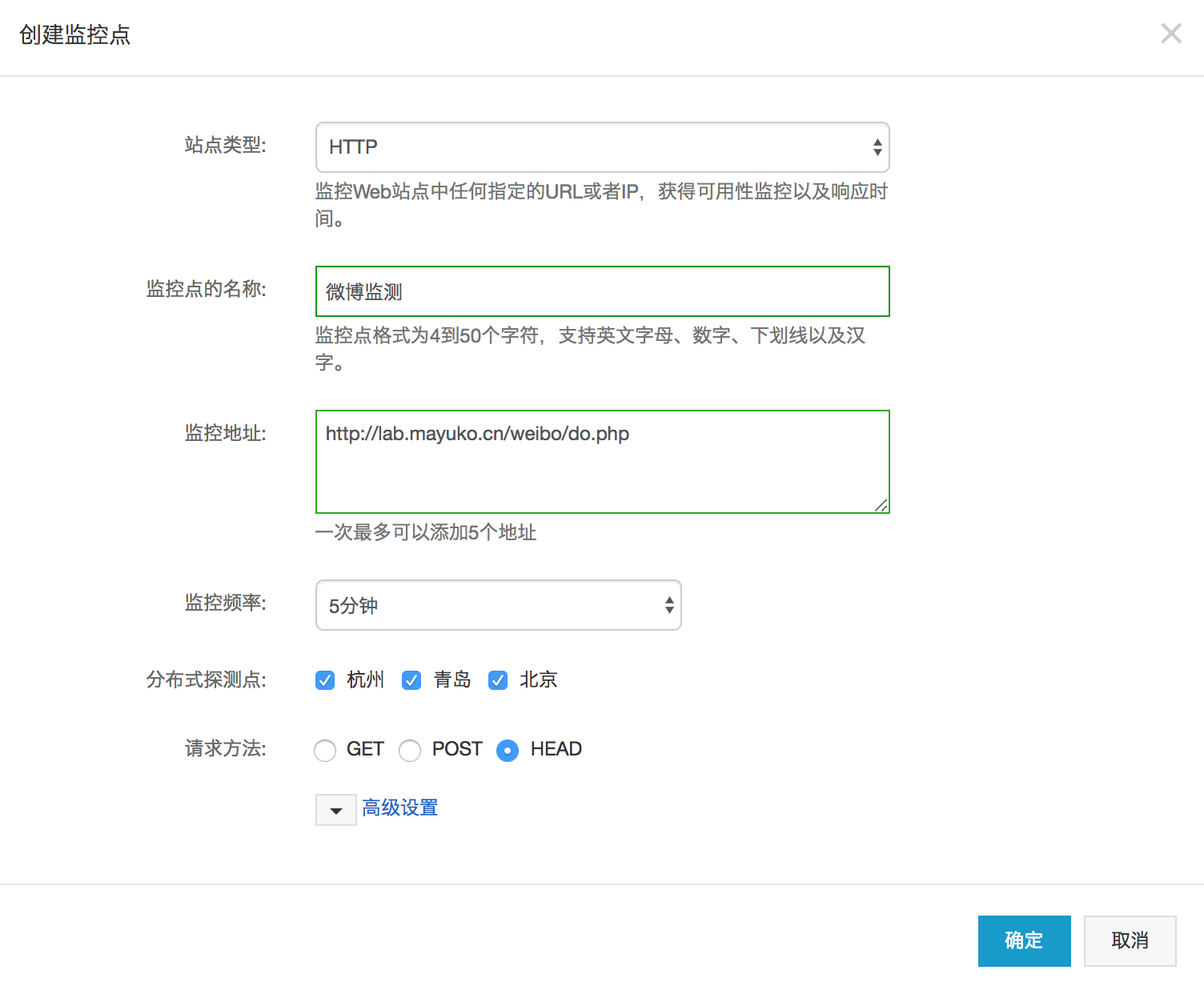
1)使用阿里云监控
通过阿里云监控执行监控任务。
2)使用 crontab 命令执行监控任务
安装
yum -y install vixie-cron
yum -y install crontabs
重启服务
service crond restart
编辑任务
crontab -e
每15分钟执行任务
15 * * * * /html/server/php/bin/php /html/www/do.php >> /html/www/corntab.log
crontab基本格式:
基本格式 : *  *  *  *  *  command
分 时 日 月 周 命令
第1列表示分钟1~59 每分钟用*或者 */1表示
第2列表示小时1~23(0表示0点)
第3列表示日期1~31
第4列表示月份1~12
第5列标识号星期0~6(0表示星期天)
第6列要运行的命令
最后
不仅是微博,获取的数据也可以即刻的任意一个主题,扩展性可以说是很高很高了。
还有,我哪有女朋友? (逃
#EOF